For a first-time business owner, learning how to lease a copier New York companies can rely on understanding print volume, equipment needs, lease terms, total costs, and service coverage. The process is straightforward when handled in six steps: assess printing needs, choose the right machine, select a lease term, compare costs and services, review the agreement, and schedule installation.
A copier lease can give a business access to professional equipment without requiring the full purchase price upfront. However, the lowest monthly payment is not always the best deal, especially when service fees, usage charges, upgrades, or end-of-lease terms are involved.
This New York copier leasing guide explains each stage in plain language so first-time businesses can make a more informed decision. It also explains how to lease a copier for the first time in New York, including what to check before signing a contract.
Step 1: Assess Print Needs and Monthly Volume
The first step in how to lease a copier for the first time in New York is to determine how much the office actually prints, copies, and scans each month. Businesses should review copier meter readings, printer usage, supply orders, invoices, and departmental printing habits to create a realistic monthly estimate.
Fortunately, finding that number is easy. There are four reliable ways to estimate monthly print volume:
- Pull the meter reading from the current copier’s display or settings menu, then compare it to the reading from 30 days earlier.
- Check toner purchase history, since most cartridges list an approximate page yield on the box.
- Count paper usage, because one ream equals 500 sheets.
- Use headcount as a fallback when no other data exists.
Below is a rough starting point for offices with no meter data available. Businesses should treat it as a sanity check rather than a final answer, since a three-person law firm can easily out-print a ten-person sales team. Once the number is in hand, the next step becomes much simpler.
| Employees | Typical monthly pages | Suggested speed | Device class |
| 1–5 | Under 3,000 | 25–30 ppm | Desktop MFP |
| 5–15 | 3,000–10,000 | 30–40 ppm | Small office |
| 15–40 | 10,000–25,000 | 40–55 ppm | Mid-volume |
| 40–100 | 25,000–50,000 | 55–75 ppm | High-volume |
| 100+ | 50,000+ | 75+ ppm | Production |
Step 2: Choose the Right Copier Type for the Office
Once volume is known, the machine choice narrows quickly. The two biggest decisions are speed, measured in pages per minute, and whether the office genuinely needs color. Color pages typically cost four to eight times more than black-and-white pages, so this choice affects the monthly bill for years.
Beyond speed and color, modern multifunction copiers differ mainly in their software and finishing features. A law firm cares about single-pass duplex scanning and secure print release, while a real estate brokerage cares about color accuracy and heavy paper stock. Here are the features that matter most to first-time leasers:
- Scan-to-email, scan-to-folder, and cloud scanning for paperless workflows
- Secure print release by PIN or badge, which keeps sensitive documents off the output tray
- Hard drive encryption and overwrite, often required in medical and legal offices
- OCR and searchable PDF output for anyone who archives documents
- Finishing options such as stapling, hole punching, and booklet making
- Color access controls that limit color printing to specific users or departments
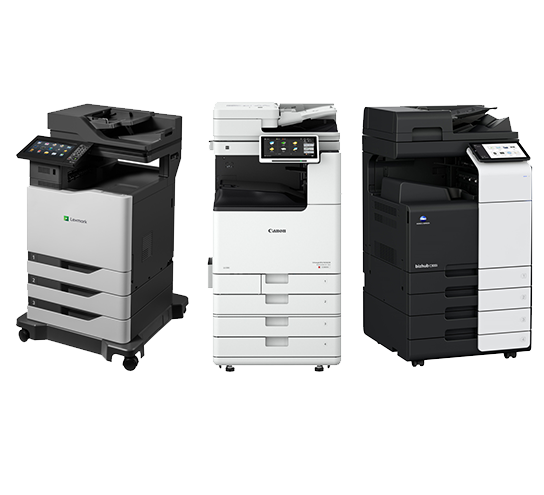
Nearly every major brand is available to lease in the five boroughs, including Canon imageRUNNER ADVANCE, Ricoh IM, Xerox AltaLink and VersaLink, Kyocera TASKalfa and ECOSYS, Sharp, Toshiba e-STUDIO, Konica Minolta bizhub, HP, and Lexmark. Certified pre-owned machines are also worth asking about, since they can cut the monthly payment significantly in a shorter term. A good dealer will recommend two or three models rather than pushing a single flagship unit.
Step 3: Compare Copier Lease Costs and What Is Included
Cost is one of the most important parts of deciding how to lease a copier New York businesses can afford over the full contract period. The monthly equipment payment is only one part of the calculation, because service, supplies, usage, installation, and optional features can affect the total cost.
The exact price depends on the equipment class, speed, color capability, monthly volume, features, lease term, service package, and other contract details. Therefore, businesses should request an itemized quote instead of comparing providers based only on advertised monthly payments.
Copier Lease Price Range
The following figures are placeholders to confirm with current CCTS pricing and market research before publishing. They are included to show how the article can present pricing clearly without treating unverified figures as current New York market rates.
| Copier Tier | Example Monthly Lease Range* | Best For |
| Entry-level office copier | $–$/month | Small offices and light volume |
| Mid-range multifunction copier | $–$/month | Growing businesses |
| High-volume office copier | $–$/month | Busy departments and larger offices |
| Advanced color multifunction copier | $–$/month | Client-facing and color-heavy workloads |
| Production-level equipment | $–$/month | Very high-volume printing |
* Placeholder figures. Confirm current pricing before publication. Actual payments vary by equipment, lease term, credit, print volume, service agreement, accessories, and provider.
A complete comparison should show the equipment payment separately from the cost-per-page or maintenance agreement. Businesses should also ask whether toner, parts, labor, preventive maintenance, remote support, and onsite repair are included.
Step 4: Review the Agreement for Fees and Clauses
This is the step that separates a good lease from an expensive one. A copier lease is a binding financial contract, and in most cases it is non-cancellable once signed. Reading it carefully for twenty minutes can save a business thousands of dollars.
Certain charges appear in agreements regularly but rarely get mentioned during the sales conversation. First-time leasers should look specifically for the following:
- Escalation clauses that raise the payment 3% to 10% every year
- Minimum monthly volumes billed whether the pages are printed or not
- Overage rates charged above the included page allowance
- Property tax and insurance pass-through billing
- Documentation and administrative fees, commonly $50 to $150
- Return, freight, and refurbishment charges at the end of the term
- Supply agreements that run longer than the hardware lease
Before signing, three clauses deserve a second look. Auto-renewal (evergreen) clauses extend the lease automatically unless written notice arrives 30 to 90 days before the end date, so a calendar reminder should be set the day the contract is signed. Early termination usually requires paying the remaining balance plus residual, and rolling that balance into a new lease means financing two machines at once. End-of-lease options should be spelled out clearly, including who pays to de-install and ship the copier back, which can run $300 to $800. Businesses that want to lease a copier New York dealers will stand behind should insist that the service term matches the lease term exactly.
Sign 5: Sign the Lease and Schedule Installation
After the agreement is approved, the process moves quickly. A credit application is submitted, the leasing company issues approval, and the dealer schedules a site survey to confirm power, network access, and physical clearance. Most offices go from signature to working copier in three to ten business days.
Installation day should include more than dropping off a machine. A proper install covers network configuration, driver deployment to every workstation, scan destinations, and a short training session for staff. Businesses should also confirm the guaranteed service response time in writing at this stage rather than after the first breakdown.
Finally, the account should be set up for ongoing management. That means automated meter reading, automatic toner replenishment, a named service contact, and a scheduled account review. These small details are what make the difference between a copier that quietly works and one that becomes a daily frustration.
Make the First Copier Lease a Smarter One
Learning how to lease a copier for the first time in New York does not have to be complicated. By assessing print volume, choosing equipment carefully, comparing total costs, selecting an appropriate lease term, reviewing contract language, and planning installation, a business can approach leasing with greater confidence.
Clear Choice Technical Services helps businesses evaluate copier leasing and office equipment solutions based on their operational requirements. For businesses ready to lease a copier New York offices can depend on, the next step is to compare equipment and service options with a knowledgeable provider.
Get a copier lease quote for your New York office. Call (718) 583-0098 or email sales@clearchoicetechnical.com to discuss equipment, leasing, and service options.